Versions and changes
Switch between the draft, the published version and the changes a publish would make.
A document has up to two versions in the Delivery API: the draft, which Preview: true returns, and the published version, which every other request gets. The switch above the tree picks which one you see.
- Draft is the default, because it is the version you are editing. A dot on it means the draft has changes that are not published yet.
- Published is what frontends get today. It is disabled for a document that has never been published.
- Changes compares the two and shows what publishing the draft would change. Once it is selected, it shows how many changes there are.
Changes
The Changes view shows the draft’s tree with every difference marked, and opens the branches that contain a change.
The Changes as switch sets how a difference is drawn:
- Diff, the default, shows a changed value as two lines, like a code review: the published value in red, then the draft’s in green.
- Inline keeps a changed value on one line, the published value struck through next to the draft’s.
Values only in the draft are green, and values only in the published version are red, either way.
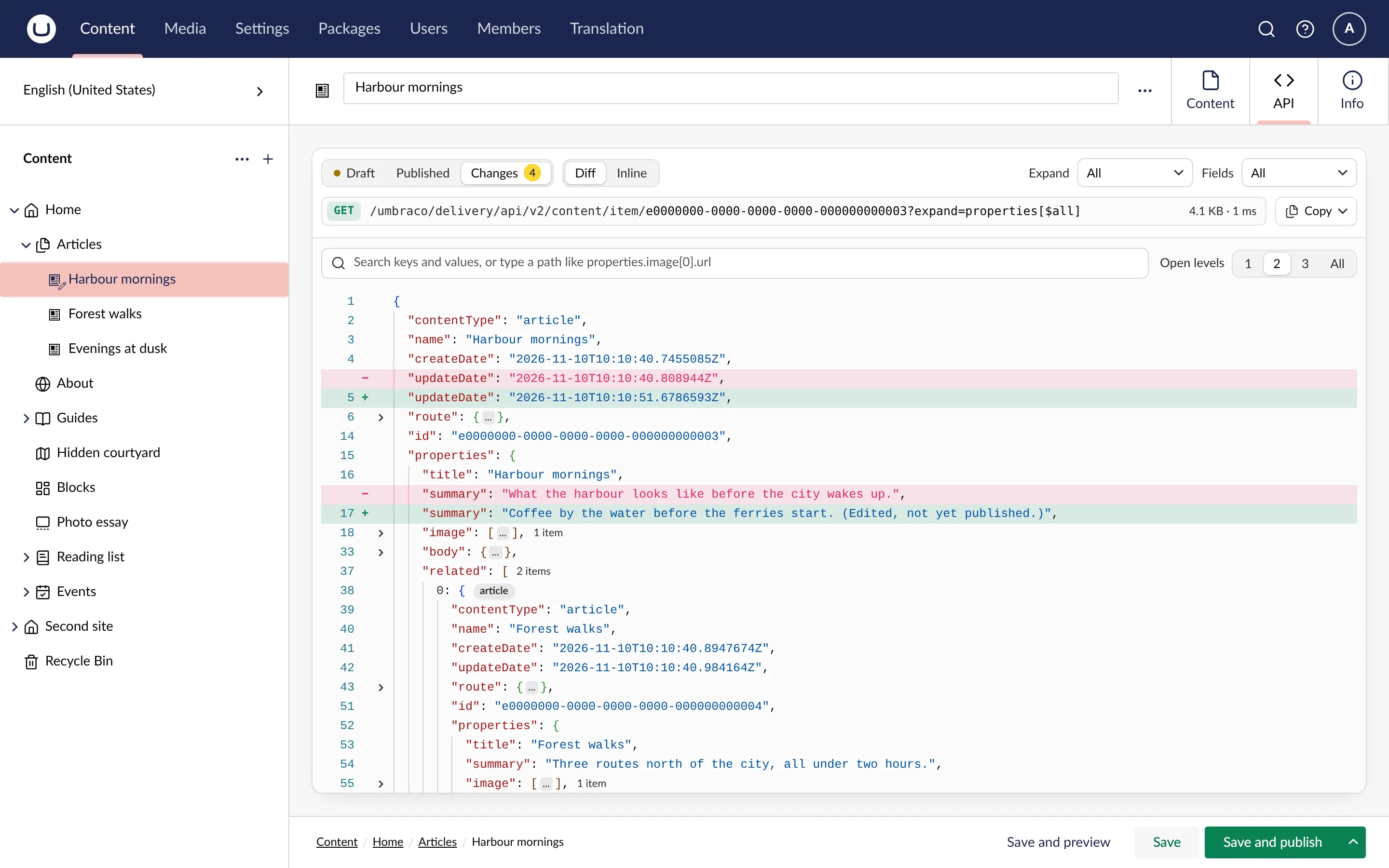
The tab reloads when you save or publish the document.
Media
Media items have no draft, so the media tab has no version switch.
Cultures and segments
On a document that varies by culture, the tab shows the culture you are editing, and sends it as Accept-Language. The same goes for a segment, sent as Accept-Segment.